The AI Productivity Paradox: Why Experienced Developers Are Slowing Down
- 6 minutes - Feb 2, 2026
- #ai#productivity#development#tools#research
There’s something strange happening in software development right now, and I think we need to talk about it.
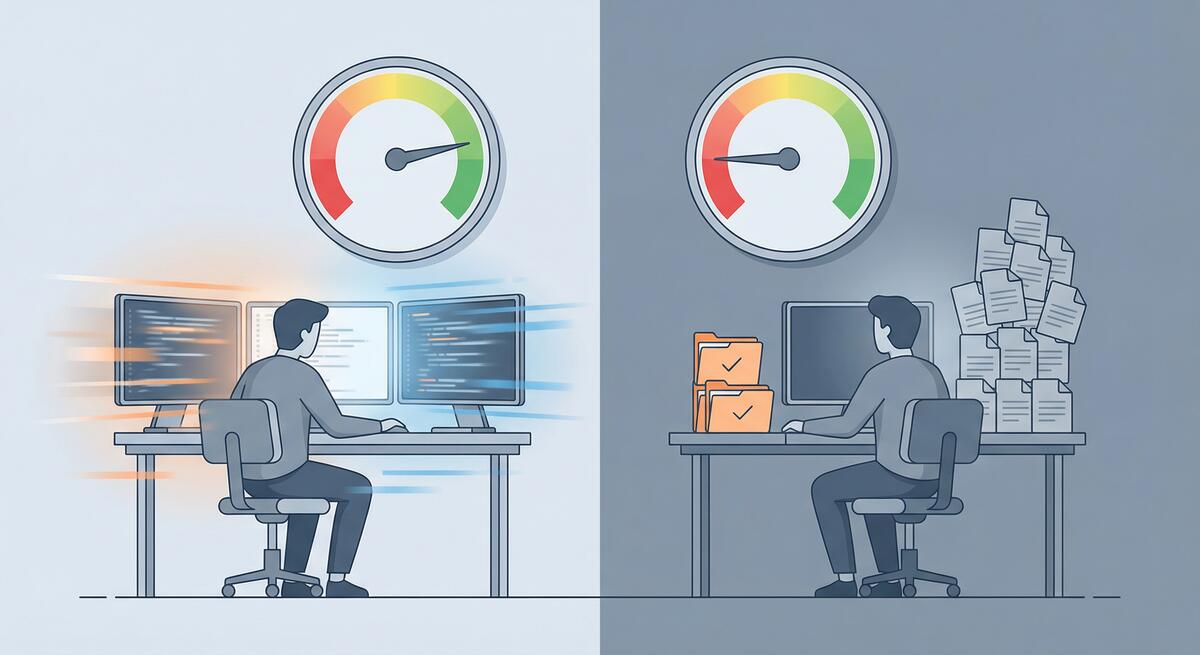
Recent research has surfaced a troubling finding: experienced developers working on complex systems are actually 19% slower when using AI coding tools—despite perceiving themselves as working faster. This isn’t a minor discrepancy. It’s a fundamental disconnect between how productive we feel and how productive we actually are.
As someone who’s been experimenting with AI tools extensively (and writing about the results), this finding resonates with my experience. Let me break down what’s happening and what it means for engineering teams.
The Perception Gap
First, let’s acknowledge what makes this finding so counterintuitive. When you’re using an AI coding assistant, you’re constantly receiving suggestions, completions, and generated code blocks. There’s a sense of momentum—things are appearing on your screen faster than you could type them. Your brain interprets this as productivity.
But here’s the problem: receiving code and shipping working features are two very different things.
The research suggests that while AI tools accelerate certain mechanical aspects of coding (typing, boilerplate generation, syntax lookup), they introduce new costs that more than offset these gains for experienced developers working on complex problems.
The Hidden Costs
Cognitive Load of Context Switching
Using AI effectively requires constant context switching between two distinct modes of thinking:
- Coding mode: Thinking through logic, architecture, and implementation
- Prompting mode: Formulating requests, evaluating outputs, and deciding what to accept
This switching isn’t free. Every time you pause to craft a prompt, evaluate a suggestion, or decide whether generated code actually solves your problem, you’re paying a cognitive tax. For experienced developers who have internalized many coding patterns, this overhead can exceed the time saved by the generated code.
I’ve noticed this in my own work. When I’m in flow state—when I know exactly what I need to build and how—stopping to prompt an AI assistant often breaks that flow. The generated code might be technically correct, but the interruption cost is real.
The Validation Burden
AI tools generate code that looks plausible. It follows conventions, uses appropriate syntax, and often appears professionally written. But “looks right” and “is right” are not the same thing.
Experienced developers know that subtle bugs are the most dangerous ones. An off-by-one error, a race condition, an edge case that wasn’t considered—these are the issues that cause production incidents. And they’re exactly the kinds of issues that AI-generated code can introduce while appearing perfectly reasonable.
This creates a validation burden that didn’t exist before. You’re not just reviewing your own code anymore; you’re reviewing code that someone else (something else) wrote, with reasoning you can’t fully trace. For complex systems where correctness matters, this review process takes time.
Hallucination Debugging
AI models hallucinate. They invent APIs that don’t exist, reference documentation that was never written, and confidently suggest approaches that fundamentally won’t work. When this happens, you don’t just lose the time spent generating the bad code—you lose additional time debugging why the “solution” doesn’t work.
For experienced developers, this is particularly frustrating. You often know enough to recognize when something is wrong, but not immediately why the AI suggested it. Untangling AI hallucinations from genuine bugs adds a new category of debugging work that simply didn’t exist before.
When AI Helps vs. When It Hurts
The research finding isn’t that AI tools are universally bad for productivity. It’s that they hurt experienced developers on complex tasks. This distinction matters.
Where AI Likely Helps
- Boilerplate generation: Repetitive code that follows clear patterns
- Unfamiliar territory: Languages, frameworks, or APIs you don’t know well
- Documentation lookup: Faster than searching through docs manually
- Junior developers: Those still building mental models of coding patterns
- Simple, well-defined tasks: CRUD operations, standard implementations
Where AI Likely Hurts
- Complex architecture decisions: AI can’t understand your system’s full context
- Performance-critical code: Generic solutions often aren’t optimal
- Security-sensitive code: Plausible-looking vulnerabilities are worse than obvious ones
- Deep domain logic: Business rules that require nuanced understanding
- Experienced developers in flow: Interruption cost exceeds generation benefit
The pattern I’m seeing: AI tools are most valuable when you’re operating outside your expertise, and least valuable when you’re operating within it.
What This Means for Engineering Leaders
If you’re leading an engineering team, this research has important implications.
Don’t Mandate Universal AI Adoption
The temptation is to push AI tools on everyone, assuming more AI equals more productivity. The research suggests this is wrong. Forcing experienced developers to use AI tools on complex tasks might actually slow your team down.
Instead, let developers choose when AI tools are helpful for their specific work. Trust their judgment—they can feel when the tools are helping versus hindering.
Measure Actual Output, Not Activity
Many organizations are seeing increased commit frequency and lines of code changed since adopting AI tools. This feels like progress. But lines of code isn’t a productivity metric—it’s an activity metric.
What matters is whether you’re shipping working features faster, with acceptable quality. If your cycle time hasn’t improved (or has gotten worse), the AI tools might be creating the illusion of productivity without the substance.
Invest in Code Review Capacity
If your team is using AI tools extensively, your code review burden has likely increased. AI-generated code needs more careful review than human-written code because the reasoning behind it is opaque.
Consider whether your review processes need to adapt. You might need more reviewers, more thorough reviews, or new tools specifically designed to catch AI-generated issues.
Create Space for Deep Work
AI tools encourage rapid iteration: prompt, generate, evaluate, repeat. But some problems require sustained, uninterrupted thinking. If your engineering culture has shifted toward constant AI interaction, you might be losing the deep work time that produces your most valuable technical insights.
Protect time for your senior engineers to think without interruption. Not every problem is best solved by generating more code faster.
The Broader Lesson
This productivity paradox reflects a broader truth about technology adoption: new tools change how we work, and those changes aren’t always improvements.
AI coding assistants are genuinely useful. I use them regularly, and they help me in specific contexts. But they’re not a universal accelerant. They’re a tool with tradeoffs, and understanding those tradeoffs is essential to using them effectively.
The developers who will benefit most from AI tools are those who understand when to use them and when to set them aside. The teams that will benefit most are those that measure actual outcomes rather than adopting tools based on hype.
For experienced developers feeling pressure to use AI tools even when they don’t help: trust your instincts. If you’re faster without the AI, work without the AI. The goal is shipping great software, not demonstrating that you’ve adopted the latest technology.
And for engineering leaders: be skeptical of productivity claims that aren’t backed by outcome data. The research is clear—AI tools don’t universally improve productivity, and for your most experienced engineers working on your most complex problems, they might make things worse.
The paradox isn’t that AI tools are bad. It’s that feeling productive and being productive aren’t the same thing. Understanding that difference is the first step toward using these tools wisely.